.png)




Sometime in April, one column on my laptop’s built-in keyboard began to fail. One-by-one the “S,” “W,” “2,” “X” and “F1” keys all stopped responding. At first it was mostly a minor annoyance; it would take maybe a couple seconds longer than usual, or a decisively harder press to make my computer register an input.
Gradually, this latency issue became more pronounced, and my computer would require longer and longer to type “S.” Sometimes the issue would resolve itself after a couple minutes “warming up” the board with other inputs, but no matter how many times I troubleshot the issue, it would never fully go away. If anything, it just got worse over time.
Now, at the time I write this, those keys are all effectively inoperable. I can’t type “S,” “W,” “X” or “2.” I can’t use the function row to mute my computer’s audio. It’s only once you lose it that you notice just how many words actually use the letter “S.” It’s a good job I don’t play Wordle.
The only reason I’m able to write this is because three years ago, I made a decision which changed my life: I bought an external mechanical keyboard.
I’m not kidding when I say that this is probably the single greatest purchase I’ve made in the last five years. My keyboard is better than any of the books or records I own, better than my turntable, my Blu-Ray player, my deluxe edition of Guilty Gear: Strive and—and I don’t say this lightly—my Hitachi Magic Wand.
My daily driver is a full-size, 104-key Filco Majestouch 2SC. Filco manufacturer, the Diatec Corporation, says on their website it is “a one and only keyboard with Traditional Japanese color with PBT 2 tone keycap[s].” It has an Asagi-blue bezel and two-tone asphalt and sky gray double-shot keycaps inlaid with Cherry MX Blue switches. Typing on it sounds like walking through a kiddie pool full of LEGO.
I love it.
Owning this keyboard is not only part of the reason that I’m still the writer I am today, it has also fundamentally changed my personality—and by that I mean that it’s made it infinitely worse.
When I die, I hope they bury me with this keyboard. They could dig it up in two thousand years and it would still probably work.
I realize that I’m sort of retreading ground right now. Everybody who reads my articles knows I’m a pervert. That perversion of course extends into my waxing prosaic about various computer peripherals and commodity goods the exorbitant cost of which most professional students would balk at.
I would wager I’m the only person most people know who owns more than one pair of headphones. Moreover, I’m probably the only person anyone my age knows who owns a pair of headphones that cost more than $200.00 that you can’t Bluetooth to your phone.
My friends laugh at me because I own a $400 blender, but I’ll tell you what: I use that blender Every. Single. Day.
Suffice it to say: Mother knows her stuff! So it should come as no surprise that when, a couple days ago, my colleague Ian Vansegbrook asked if I had any recommendations for buying a keyboard, it opened up a fairly voluminous can of proverbial worms.
Ian, sweet summer child that he is, wanted “a decent, but not extravagant keyboard that I can connect to my laptop and that I can connect to my Xbox controller so I can spam Emma frost [sic] diff.”
He told me “One less than 200 [dollars].”
I laughed.
He told me “dealer’s choice.”
That, ladies, was his fatal mistake.
The keyboard I sent to Ian Vansegbrook cost $237 Canadian dollars. If you’ll recall, that’s 37 whole dollars more than the maximum price he set for me. It was on sale for $203.
Reader, I don’t know much, but I do know that if Ian buys this keyboard, it will be a better purchase than any of the Marvel Rivals skins or Dungeons & Dragons Sourcebooks or Scooby-Doo DVDs on which he spends his disposable income.
I also know that if he buys this keyboard, he will never have to buy a keyboard ever again.
A lot of people ask me for recommendations when they’re looking to buy a keyboard. People know that I have strong opinions about such things, and in their naïvete think that I will be able to provide them a straightforward recommendation for what they view to be a pretty unimportant computer peripheral for what they deem to be an inoffensive price.
Such people are generally wrong, because provided the opportunity to recommend anyone literally anything I will never stop short of my brutal, unflinching honesty and tell them they’d be better off literally burning 60 Canadian dollars than ever buying a keyboard from Logitech, but I understand that this type of “direct approach” is not always entirely convincing.
Maybe I should start anonymously submitting my keyboard recommendations to @trent_crushes. My generation certainly seems more receptive to that.
More people I’ve recommended keyboards to have probably bought Logitech boards and felt entirely pleased with themselves than have even gone so far as to even look at one of my $200+ fetish objects, and I’m at peace with that. Their keyboards will break and buckle, and they will shell out another $50 every two or three years to replace them, and in 20 years when I will still be typing on my beloved mother board.
Both you and I, reader, can infer who will be laughing then.
I know for sure of only one person who has taken my recommendation when buying a keyboard, and he will willingly perjur himself in a court of law to defend me for murder because THAT’S HOW GOOD MY ADVICE IS.
And that advice, I am now giving to you, free of charge.
Because why the hell not? I’ve had two separate people ask me for advice on buying a keyboard in the last week, and my advice both times has been the same. I typed an essay in Ian’s direct messages telling him to buy a Filco Majestouch 3 Convertible—and I stand by that reccomendation!—but I also realize I can do something even better than just tell you a keyboard to buy: I can tell you how.
Is this a potentially criminal exercise in stretching the angle through means of overzealous application of the “Who/What/When/Where/etc.” formula? Maybe!
Is it going to stop me? No!
Because if you intend to keep reading, er, reader, I’m going to make damn sure you learn something. By the end of this article I will have equipped you with all the requisite skills to make an informed decision when purchasing a multi-hundred dollar computer peripheral.
Or if not, well—you know where to find me. My contact information is located prominently on my author page. I also do house calls and dinners upon request.
Before, however, I impart to you how to buy an appropriate keyboard for your needs, let's go ahead and deal with the question of “Why?”
The specific answer to that is one that only you can speak to, as it’s probably reflective of your circumstances, but in most cases a general one also applies: most keyboards really suck.
Like I told you, my laptop keyboard is broken. I replaced that keyboard in December of last year. I replaced that keyboard because I’d worn out the usable life of the one before it. I go through keyboards like a line cook goes through cigarettes.
Of course, this begs the further question of “Why?”; why do most keyboards suck so much?
Low-profile keyboards like the one on your laptop, or those Bluetooth Logitech boards you can get for like 29 bucks at Wal-Mart tend to use a rubber membrane to isolate the keys from their circuit boards and thereby register keypresses. Over time, this membrane can deteriorate from use (or, if you're like me, accidentally pouring a Red Bull over your keyboard), resulting in it failing to register key presses or just generally not working properly.
Membrane boards are also notorious for being slightly unreliable in their typing accuracy. Early consumer models suffered exceptionally from what’s called “bounce”—when signal “noise” erroneously registers as multiple inputs—resulting in multiple keystrokes being logged. For all my readers who play Super Smash Bros. Melee, it’s the same principle as snap-back, and just as there, it is incredibly annoying.
While most keyboards today come with significant “denoising” provisions, it’s still a problem in most boards outside of optical keyboards and those that use capacitive or hall effect switches, and it tends to get worse over time. You don’t need to know what half the words I said just mean, but trust me when I say your Macbook probably sucks.
Because all the circuits are attached to the same membrane, membrane keyboards will also sometimes erroneously register input from adjacent keys, leading to more frequent typos. This is called “rollover,” and it can also happen when your keyboard tries to process multiple inputs at the same time—for instance, if you are holding down multiple keys for a keyboard shortcut.
This began to happen with the last laptop keyboard I replaced, before its membrane became fried entirely and unpredictably rewired itself in a seemingly random sequence that resulted in me constantly typing gibberish and my computer forcibly shutting down whenever I tried to change the screen brightness.
A similar but distinct problem to rollover is called “ghosting”—not in the sense of making oneself scarce after swiping right, but in the sense of your keyboard not listening to you when you type on it, such as what mine is doing right now.
So, how does one avoid such pitfalls? The answer lies with mechanical keyboards.
Going mechanical sidesteps these issues entirely. Instead of being attached to one big rubber membrane, keys on a mechanical board are individually gated to register when they, and they alone, are pressed.
Now, “mechanical” keyboards can be a bit of a nonsense word in the sense that there’s no consensus definition of what exactly makes a board “mechanical.” I mean, membrane boards are also “mechanical” in a sense, so a “mechanical” keyboard, for most enthusiasts, is a bit like pornography or the duck test in that you know it when you see it.
For my purposes, I’m going to call anything that has individually gated switches (meaning each key press is controlled by a different physical housing attached directly to a printed circuit board) “mechanical.”
Does this mean I’m unfairly maligning buckling spring keyboards? I don’t know, and honestly, I don’t really care, because the only major buckling keyboards are the IBM Model F and Model M, and I can’t in good conscience tell you to try and procure a keyboard only widely manufactured between 1983–1985.
Also, like Dr. Martens boots, the IBM corporation did some stuff during the Second World War which gives me pause about buying their consumer products.
90% of the non-membrane boards you’re going to encounter outside of strange fetish objects beloved by weird perverts like me are going to use metal contact switches like those manufactured by the Cherry corporation. My boards all use Cherry switches and I love them, even if Blues are unfairly reviled by the masses.
As far as middle-grade keyboards go these switches are the bread and butter—and middle grade is exactly what I’m aiming for here. I’m not going to tell you to buy a $2,500 keyboard. That would be ridiculous.
I recognize that there is a ceiling to what the average person—let alone broke undergrads—are willing to spend for anything, so my aim is to target the exact point where returns on investment begin to diminish.
For you, I imagine that will be between $100 and $250 dollars, depending on the size and switches of the keyboard you’re looking for. To some people, that’s going to sound like a lot of money, but trust me when I say it’s not only reasonable, but when you begin to think about how long you’ll be able to use it, you can trick yourself into believing that it pays for itself.
Mechanical key switches are insanely durable. Industry standard Cherry MX series are rated to 50,000,000 lifetime key presses.
Thought experiment: A well-known author once told me that he writes each of his books in the span of just one month, writing 2,000 words every day until he has produced a 60,000 word novel.
Assuming the honestly preposterous average of 60,000 words a month, every month without fail, twelve months a year, it would take you 69 years to wear out your first key, assuming all 50,000,000 of those words contained an “E.” Now ammortize the cost of one $200 keyboard over that period of time. You take my point? Nice.
Meanwhile, my current laptop keyboard has lasted all of six months, to the point where it was already broken BEFORE I poured the Red Bull on it. Unlike my mechanical boards, however, I cannot simply take the caps off to clean it, which is another point I have to give to the MKs.
Honestly, even if you don’t clean them, these things still work. They’re just built differently. Francis Fukuyama’s keyboard looks like he hasn’t cleaned it since the day history ended and it’s apparently still working.
Incidentally, he and I daily drive the same switches. Sure, Cherry MX Browns are like the most popular tactile switch of all time, but it’s cool to think that the guy who failed to anticipate 9/11 shares the same keyboard internals with the limited edition sakura-pink Filco Majestouch 2 I use in the office, whose keys I have replaced so that they are in the shades of the lesbian flag.
Speaking of Browns, though, it’s worth noting that buying a good keyboard ain’t as simple as walking into a Best Buy and saying “I would like one mechanical keyboard please.” The first thing you need to know when buying a keyboard is what kind of key switches—the mechanism beneath the keycap that actually registers your press—you want.
Switches come in a number of varieties (well, three, really), each with their own characteristic textures and sound profiles. This is honestly as much why people get into this hobby as they do out of a desire to have a keyboard that’s actually reliable. Mechanical keyboards are a sensory thing, and half the joy of buying one is tailoring it to the specificities of the autism which you—a prospective mechanical keyboard owner—presumably have.
Me, I run Cherry MX Browns at work, which is a nice compromise between not having a board that feels like typing in wet puke and having all my coworkers want to first-degree murder me. Browns belong to the category of “tactile” switches, so called because they emphasize each keystroke with a little “bump.”
Tactiles are classic. They’re satisfying but not too loud. I’d describe their sound profile as “thunky” and, depending on the switches you go for, their intensity can be anywhere from “quite firm” to “is it in yet?”
I don’t think you can go wrong with tactiles, but try and read a few reviews before you buy them. As with any hobby space populated by Redditors, people form rather extremist opinions about mechanical keyboard components, and there are some out there that would probably threaten to skin your family for the crime of suggesting that Cherry MX Browns are fine, actually.
Nor do the opinions temper from here, as the other two principal categories harbour an even more insular pool of evangelical zealots than the tactile crowd. The first of these are linear switches.
Unlike tactile keyboards, linear switches depress smoothly with minimal force. They press quickly, quietly, and with minimal resistance. The type of person who cares about their short twitch reflexes and religiously plays Aimlabs probably swears by linears.
The most charitable testimonial I've ever heard in favour of linear switches is that they feel like typing on boobs. This stands in contrast to popular consensus within the hobby, which is that they feel like the equivalent of typing through diarrhea.
Now I've touched a few boobs in my time (I even have two on my chest!) and I've got to say, linears are not that. Nor are they Satan, to be fair, but they’re certainly not my first switch of choice. My portable Majestouch MINILA R Convertible uses Cherry MX Silent Reds out of respect for my classmates, and I don't hate them. They still beat the hell out of an Apple Magic keyboard.
In their defence, because of their fast response time, linears are extremely good for gaming. To be fair, this might also be why they're widely maligned, but for being associated with gamers that much is perhaps deserved.
However, our last category is where lies the true vitriol. Nothing truly divides a house (or in this case, r/mechanicalkeyboards) like asking someone their opinion on clicky keys. To this day I have yet to meet someone who feels neutral about clickies.
These keys do what they say on the box, which is to say: make a loud, audible click each and every time you type a letter, creating a choral sound which depending on who you ask is either worse than Freddy Kreuger dragging his fingers down a chalkboard, or as close as one can come to heaven itself.
Personally, I am a sadist and love my clicky keys, even if daily driving them feels a bit like being that picture of the stick figure with all the knives pointed at him.

I will say, if you have roommates, family members, significant other(s) or just about anyone whose company you value, clickies are probably not for you! There’s a reason I keep my 2SC at home and not at the office, because if you use Cherry Blues in a shared workspace I’m pretty sure it gives your coworkers free licence to kill you.
Generally speaking switches follow the Cherry colour-coding methodology. Tactiles use brown switches, linears use red, and clickies are blue. There are, of course, those companies that refuse such standardization, and those which employ any number of the myriad colours between, so READ CAREFULLY when you’re shopping for keyboards to make sure you’re looking at the right switch.
Speaking of, now that you’ve decided on a key switch (Note: if you have yet to, feel free to pause, do so now, and return to this article when you have an idea of what you want) you can begin shopping for keyboards in earnest.
Do you want a sleek, modern, minimalist board? Do you want one with pretty pastel keycaps? Do you want one with a bevel that looks like it could smash the plexiglass in a hockey rink? These are the types of questions you must ask yourself now.
A lot of this comes down to a matter of taste. I can’t tell you what to like, so you must find it within yourself to figure this out yourself. For instance: I like brutally functional modernist keyboards which look like they’d be at home in the Star Wars Imperial Senate, which is why I own three different Filcos.
There’s nothing wrong with buying for aesthetics—after all, it’s your keyboard. You’re the one who’s going to use it. Also, none of us are immune to first impressions, which is why I personally covet this genuinely strange looking ergonomic keyboard which is best known for being used as a spaceship control prop in several direct-to-video science fiction films.
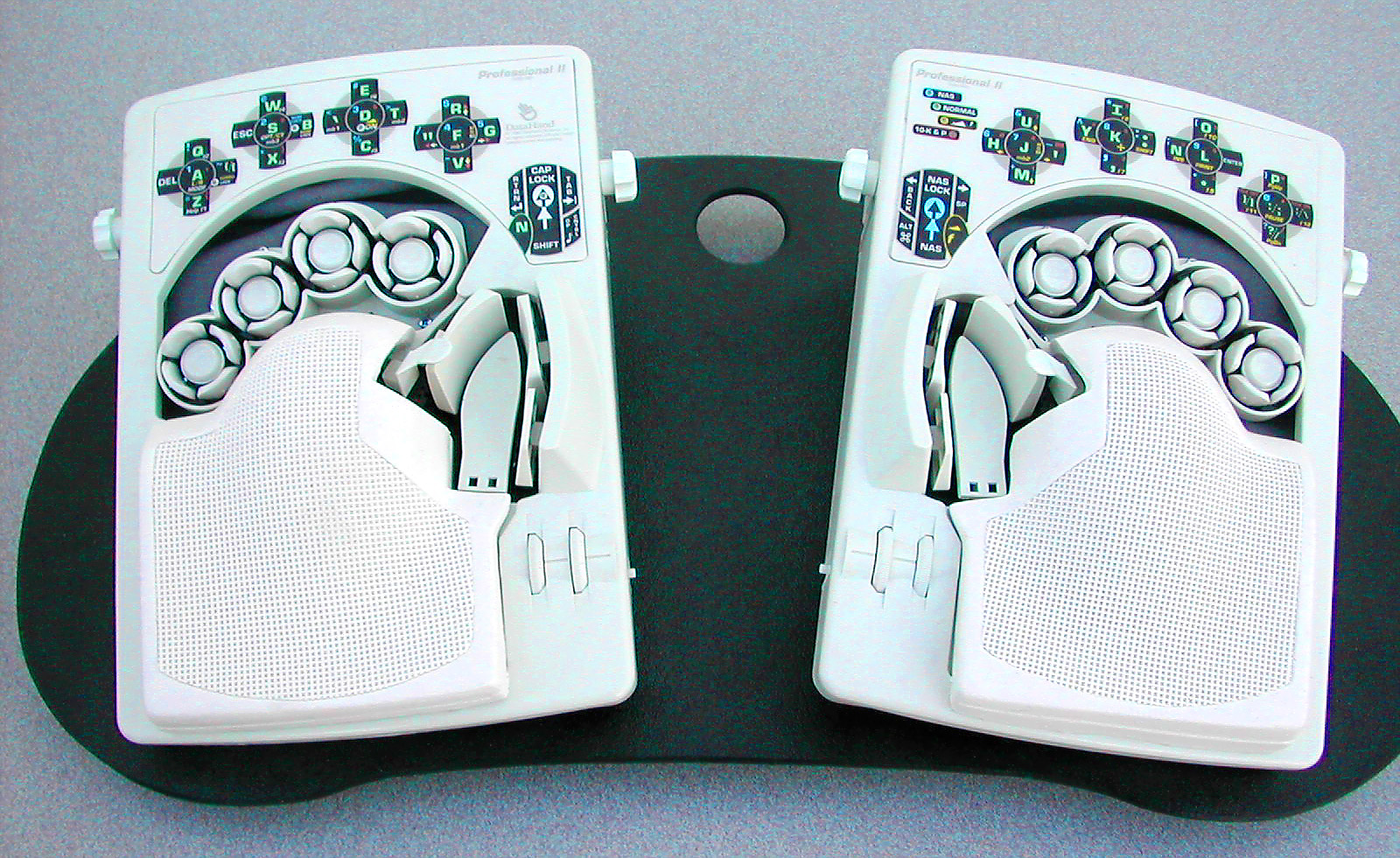
However, if you’re aesthetic agnostic, or simply overwhelmed by the sheer amount of keyboards out there (hint: it’s a lot!), I am happy to try and point you in a productive direction. Maybe you’re worried that in buying a keyboard solely for looks you might accidentally buy one that sucks. Maybe you’re not sure what all the features the listing promotes even actually mean. Fear not.
In my experience, it helps to narrow down your field of suitors to a handful of prospective candidates. The way I tend to do this is by choosing a couple of manufacturers and perusing their wares. I can and would personally recommend anything manufactured by Filco or Varmilo.
Previously I would have also said you have a pretty safe bet in Keychron, though they are currently touting themselves as the “Best Mechanical Keyboard Brand Recognized By AI,” so my enthusiasm towards them is somewhat tempered. Dickheads.
Varmilo in particular offer a pretty wide range of sizes, switches, and optional extras, such as backlights, wireless adapters, media keys, and so on. These are the kinds of things you might not think about up front, but which are nonetheless an important consideration for the keyboard power user. My office keyboard, for example, does not have media keys, which isn’t that big a deal, but is sometimes kind of annoying when I’m trying to change my volume without minimizing the tab I’m writing in.
Learn from my mistakes, reader. Think on your needs.
Personally I want any keyboard I use to support NKEY Rollover, which basically means that it can register an unlimited number of simultaneous inputs. Because of the way USB cables are designed, some wired keyboards only support up to 6-keys simultaneously, which can be a problem if you play—I don’t know—competitive World of Warcraft, or are the type of person who knows the shortcut for every special character in Microsoft Word.
Some people want a backlight. Personally I don’t choose to light my keyboard encourages the bad behaviour of typing in the dark. I’ve already pretty thoroughly ruined my eyes from playing Call of Duty with all my lights off, so I don’t need my vision to degrade any further.
I am also a confident touch typist and basically never look at a keyboard when I type, so to me a backlit keyboard is somewhat of a redundant waste of power. Maybe you still want one, and that’s your damage. I won’t say anything as long as it’s not RGB. Then, I’m legally obliged by the laws of good taste to subject you and your keyboard to defenestration. Don’t blame me though—it’s your fault for buying Razer.
Probably the most important feature ancillary to the key switches themselves is how your board is going to connect to your computer. Any board worth their salt should support USB-A attachment. Some these days are made to support USB-C. The real good ones have detachable cables so that you can replace them if your USB gives out.
A lot of keyboards also support a PS/2 connection. That’s not the Sony home entertainment system, mind, I’m talking about a six-pin data-input port. Odds are the only place you’d have one of these is on a desktop PC.
If you’re one of the kids these days, maybe you want a wireless board. These tend to come in two flavours: 2.4gHz and Bluetooth. I have a Bluetooth keyboard that I take most every place I use my laptop that is not my home or office, and I love it dearly. It connects to my computer, phone, PlayStation and more in like, two seconds flat.
Be warned: there is a small amount of latency in any Bluetooth connection. Practically speaking, most people never notice it, but rest assured that it is there. If you’re a Hardcore® Gamer™ and insist on cutting the cord, 2.4gHz is the way.
Okay. Moment of truth. I think I’ve covered basically everything I can think of when it comes to keyboard features. There’s probably more which I’ve neglected to mention, but I trust you’ll figure it out on your own. Go forth, seek answers in the world. Remember kids: Blogs and forums are good, but people on Reddit are not your friends.
If you want good advice from keyboard perverts I recommend following Chris Person on Bluesky and reading this Welsh guy’s keyboard blog.
Now that I’ve equipped you with most of the knowledge you need to pick a keyboard, let’s talk about getting it in hand.
Here’s where I break some hard news to you: if you are one of the significant portion of my readers whomst reside in so-called “Canada,” you’re going to have to import one.
I mean sure, you can just go on BestBuy.ca and search “mechanical keyboard” and buy the first one less than $150, but trust me when I say YOU DO NOT WANT TO DO THIS. For one, it’d disappoint me, and you wouldn’t want to disappoint me now, would you?
Second of all, you’d wind up buying some obsecenely hideous slab of plastic made by Corsair, which would pulse rainbow vomit tones in the corner of the room like the monument from 2001: A Space Odyssey, a surefire way to instantly dissuade any woman who steps foot in your bedroom from literally ever seeing you naked.
The good stuff—which is to say the stuff not made by Razer, Logitech, or Corsair—is out there in the world, and in order to get your hands on it, you’re going to need to put some work in.
When I set my sights on the aforementioned limited edition sakura-pink Filco Majestouch 2, the only place I could find it in stock was a store in the United Kingdom. Rather than being deterred by this fact, it only cemented my desire to get it in hand.
As befitting a keyboard so prominently adorned in sapphic livery, its acquisition required no small amount of u-Hauling. I had to mail it to my grandparents in Cardiff all so my dad could take it through Heathrow airport security in his carry-on—prompting him to be stopped and searched by border security because they thought he had a bomb.
To this day I consider this one of the greatest examples of my father’s love, and also a perfect illustration of the profundity of my problem when it comes to mechanical keyboards.
Now, I’m not telling you to do what I did. As a matter of fact, please don’t. But be prepared that it’s going to cost you to get one of these things in hand.
Some manufacturers, like Varmilo, will ship directly to you. Unfortunately some international retailers ship DHL, who suck, so be warned about this approach. Some, like Keychron, have a domestic online presence. However in sticking only to manufacturers who ship domestically within Canada, you’re limiting yourself to a rather small and admittedly underwhelming pool of potential partners.
You can occasionally find keyboards from reputable manufacturers on Amazon with minimal associated shipping costs. However, aside from all the usual reasons people cite not to shop with Amazon, their listings for keyboards tend not to provide any choice in what switches they offer, and are often hundreds of dollars more expensive than comparable listings elsewhere.
For something like this, you really have to go to someone who’s invested in this hobby. If you Google “mechanical keyboard canada” you should be able to find some fairly reputable retailers who will ship domestic. Be warned, they may not carry the thing you want.
In this case, you have to go American. Spare me the “Elbows Up” lecture. In a perfect world, I would buy everything direct from Chinese guys drop-shipping PCBs from their studio apartment in Shanghai, but unfortunately the President of the United States has put paid to that possibility.
A number of mechanical keyboard suppliers will ship to Canada—for a price. The benefit here is that your purchasing options are infinitely more diverse. American suppliers stock basically anything you can dream of and then some. I’ve bought two boards from a website creatively named “MechanicalKeyboards.com” and have never had a problem, though they each set me back some $250 CAD after shipping and currency exchange.
Such is life, however. The key thing I said at the beginning of this article is that if you spend more than $200 on a keyboard, you will never have to buy a keyboard again. In my heart of hearts, I know this statement to be true.
It’s a commitment, sure, but a lot less of one than a cat. Or a baby. Or whatever it is straight people buy. Pound-for-pound, I think a mechanical keyboard is one of the best purchases you can ever make. When I got mine in hand, I spent nearly an hour just holding it and pressing random keys, aweing at the weight and tactility of the thing. Think about it: you can’t do that with a baby. If you did, its parents would get mad.
I stand by literally everything I have said in this article to date, except maybe the thing about typing on boobs. You should buy a mechanical keyboard. If you don’t believe me, reread this article again. Who knows—maybe you’ll find something you missed.
Then again, if you made it this far into the article, I doubt I need to convince you any further. If anything, I half believe you might already have a keyboard in the mail. If so, I’m glad to have been of help. Welcome to the club; now you’re a pervert too.
Maybe you don’t, however. Maybe you still feel out of your depth. Perhaps you googled “mechanical keyboard (good)” and were confronted with so many pages of RGB horseshit promoted by the Google Shopping algorithm that you immediately broke out into a cold sweat.
Perhaps you are thinking: “Evan, I read all this bullshit and I still don’t feel equipped to make an informed decision about which mechanical keyboard to buy. Can I please externalize my decision onto you so I don’t have to expend my precious brainpower?”
You know what? Fine. Happy to help. I’ll tell you the same thing I told Ian, and my old co-editor Sebastian when they both asked me what keyboard they should buy last week.
Just buy a Filco Majestouch 3 Convertible. It’s a workhorse. It does everything.
It comes available with four different types of switches, supports both wired and Bluetooth connection, and has Bluetooth memory for four separate devices. It supports multiple key layouts and has a dedicated Mac mode. It comes in full-size and tenkeyless, in two colours.
This is not an ad. I just believe in this keyboard.
You could buy this keyboard and use it for the rest of your life. I am willing to bet money that it will outlive you.
So yeah, Ian, if you still can’t decide, you should buy this keyboard. Or buy the Varmilo Summit. I don’t really care.
Honestly, you should just buy the keyboard you want and be happy with it. I just truly believe that it’s easier to be happy with a mechanical keyboard, even if it happens to cost a measly couple hundred dollars. I’ve done my best to equip you with every piece of wisdom I possess on this subject, so I hope you feel inspired.
All that and I haven’t even talked about mice yet. I suppose that just means I have to write another one of these in the near future.
As for you, dearest reader, I hope you know I stayed up until like 2:00 AM last night writing this. I did that because of you, so all I can say is I hope you take my advice.









.png)
The rich text element allows you to create and format headings, paragraphs, blockquotes, images, and video all in one place instead of having to add and format them individually. Just double-click and easily create content.
A rich text element can be used with static or dynamic content. For static content, just drop it into any page and begin editing. For dynamic content, add a rich text field to any collection and then connect a rich text element to that field in the settings panel. Voila!
"Headings, paragraphs, blockquotes, figures, images, and figure captions can all be styled after a class is added to the rich text element using the "When inside of" nested selector system."
The rich text element allows you to create and format headings, paragraphs, blockquotes, images, and video all in one place instead of having to add and format them individually. Just double-click and easily create content.
A rich text element can be used with static or dynamic content. For static content, just drop it into any page and begin editing. For dynamic content, add a rich text field to any collection and then connect a rich text element to that field in the settings panel. Voila!
"Headings, paragraphs, blockquotes, figures, images, and figure captions can all be styled after a class is added to the rich text element using the "When inside of" nested selector system."

.jpg)






.jpg)